Mission Control
How I ship software with AI agents, and the dashboard that tells me whose turn it is.
AI agent pipeline · Private tool
Why I built it
I work on several projects at once, and AI agents do most of the typing. Each one is good at one job. Claude Code writes the code. Grok Bot can test a change in its own VM. Replit Agent can reach the Replit side of an app: its secrets, database and deploy settings.
With that many hands, the hard part is knowing where each change stands and who has to act next. So I wrote down how work moves from idea to live, one small change at a time (a "slice"), gave every step an owner, and built a screen that reads it all back to me.
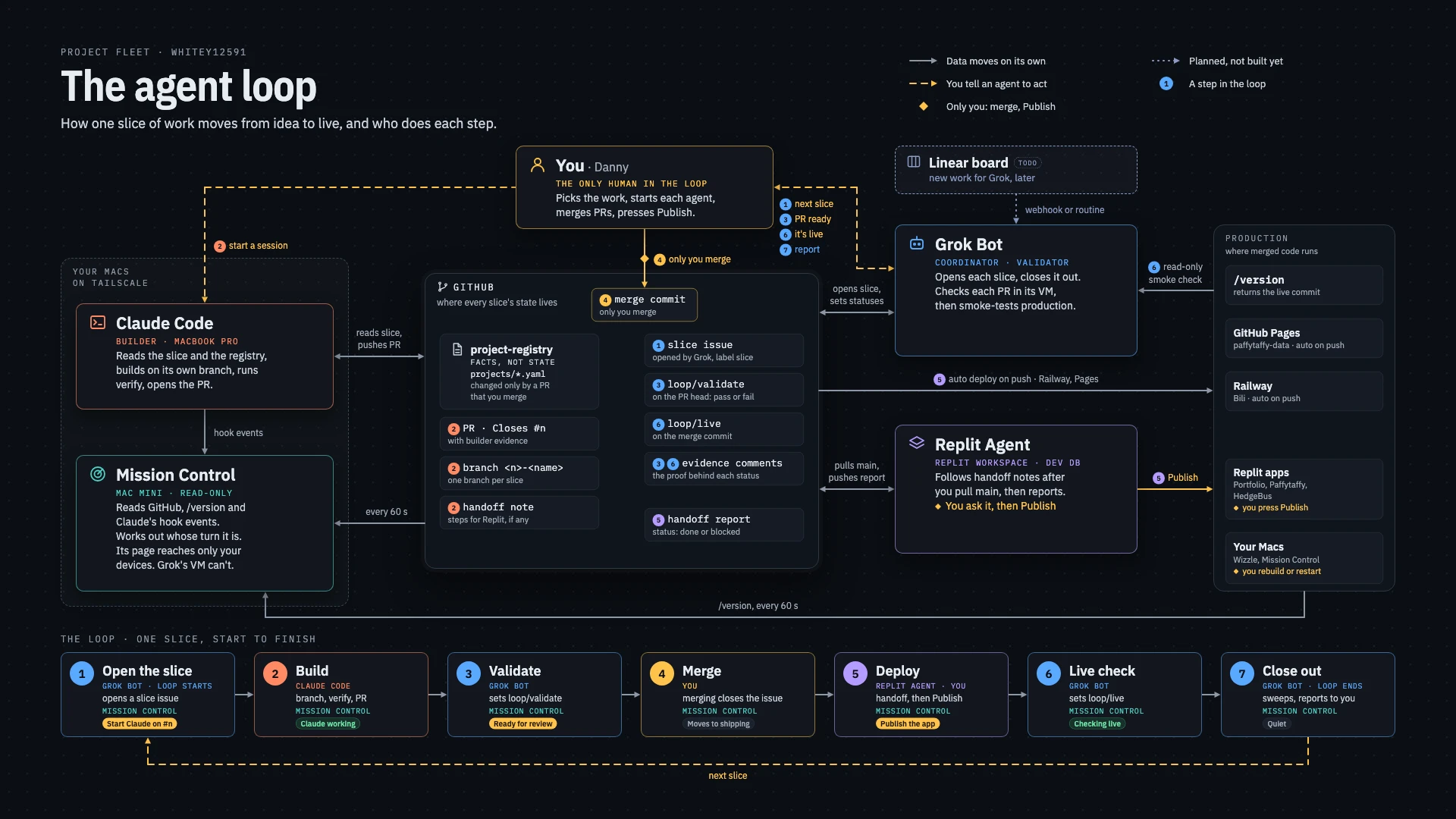
- Agents never message each other. Each one reads and writes GitHub: the issue, the pull request, its checks and the handoff notes. That's the only record of where a slice stands.
- The agent that builds a change never validates it. Claude Code builds. Grok Bot checks the work.
- Only I merge and press Publish. Anything that touches production waits for my yes.
The loop
Open the slice
Grok Bot picks the next piece of work from the project's backlog and my priorities, and opens one GitHub issue for it.
Build
Claude Code builds it on its own branch, runs the project's checks and opens a pull request.
Validate
Grok Bot runs the same checks on that pull request in its own VM and posts the evidence.
Merge
Only I merge. Merging closes the issue.
Deploy
On Replit, Replit Agent follows a handoff note and I press Publish. Projects on Railway and GitHub Pages deploy on their own.
Live check
Grok Bot checks production, read-only, and confirms the live build includes the change.
Close out
Grok Bot sweeps every project for loose ends and reports back. The next slice starts at step 1.
What it shows
One page with every project and whose turn it is on each: nobody's, an agent's, or mine. I glance at it and know what needs me.
- Your turn
- Everything waiting on me, problems first, then longest wait, each with a link to where I act. On my phone it says which ones I can do from there.
- In flight
- One row per slice across Issue, Build, Validate, Merge, Deploy and Live, lit where the ball is.
- Claude sessions
- Every Claude Code session on my Mac: working or waiting, which repo and branch, what I last asked and what Claude said last.
- Since you last looked
- What happened while I was away from the page.
- Quiet
- Projects with nothing going on, with their last push.
Green means an agent has the ball. Amber, pulsing, means I do. Red means something failed or is stuck. Only amber moves, so it keeps meaning something.
How it's built
- It never stores where work stands. It works it out from the sources on every refresh, so it can't drift from reality.
- Plain code decides every state, with one test per rule. No AI calls.
- It only reads: the project list every 5 minutes, one GitHub query a minute covering every repo, each live app's /version, and events from a Claude Code hook.
- The hook stays out of Claude's way. It prints nothing, always exits cleanly and returns in about 70 milliseconds.
- TypeScript on Node 22, with no build step and one runtime dependency. It runs on my Mac mini, reachable only from my own devices over Tailscale.
Where it stands
Mission Control runs all day on my Mac mini and tracks every project I have in the loop, this site included. Each deploy here reports its commit at /version, which is how Mission Control knows a change is live.
Next: a Linear board that feeds Grok Bot new work, and automating the hand-offs, so a ready pull request or a finished deploy reaches the next agent without me passing it along.
Want something like this for your business?
Tell me what's slowing you down.